ASP.NET MVC - 选择器
操作选择器是可应用于操作方法的属性,用于影响响应请求时调用哪个操作方法。 它帮助路由引擎选择正确的操作方法来处理特定的请求。
当您编写操作方法时,它起着非常重要的作用。 这些选择器将根据操作方法前面给出的修改名称来决定方法调用的行为。 它通常用于操作方法名称的别名。
动作选择器属性分为三种类型 −
- ActionName
- NonAction
- ActionVerbs
ActionName
此类表示用于操作名称的属性。 它还允许开发人员使用与方法名称不同的操作名称。
让我们看一下上一章中的一个简单示例,其中 HomeController 包含两个操作方法。
using System;

using System.Collections.Generic;

using System.Linq;


using System.Web;

using System.Web.Mvc;


namespace MVCFiltersDemo.Controllers {

   public class HomeController : Controller{

      // GET: Home

      public string Index(){

         return "This is ASP.Net MVC Filters Tutorial";

      }


      public string GetCurrentTime(){

         return DateTime.Now.ToString("T");

      }

   }

}
让我们通过在 GetCurrentTime() 上方写入 [ActionName("CurrentTime")] 来应用 GetCurrentTime 的 ActionName 选择器,如以下代码所示。
using System;

using System.Collections.Generic;

using System.Linq;


using System.Web;

using System.Web.Mvc;


namespace MVCFiltersDemo.Controllers {

   public class HomeController : Controller{

      // GET: Home

      public string Index(){

         return "This is ASP.Net MVC Filters Tutorial";

      }


      [ActionName("CurrentTime")]

      public string GetCurrentTime(){

         return DateTime.Now.ToString("T");

      }

   }

}
现在运行此应用程序并在浏览器中输入以下 URL http://localhost:62833/Home/CurrentTime,您将收到以下输出。
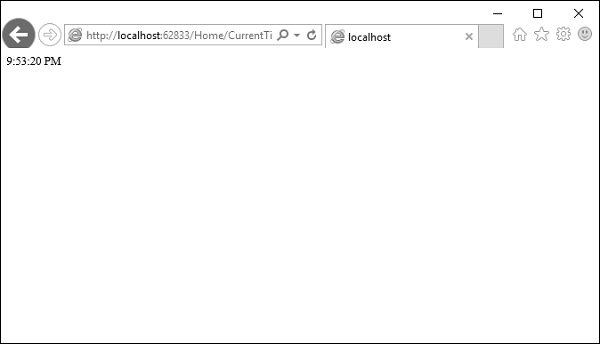
您可以看到,我们使用了 CurrentTime,而不是原来的操作名称,即上面 URL 中的 GetCurrentTime。
NonAction
NonAction 是另一个内置属性,它指示 Controller 的公共方法不是操作方法。 当您希望某个方法不应该被视为操作方法时,可以使用它。
让我们看一个简单的示例,在 HomeController 中添加另一个方法,并使用以下代码应用 NonAction 属性。
using MVCFiltersDemo.ActionFilters;

using System;

using System.Collections.Generic;

using System.Linq;


using System.Web;

using System.Web.Mvc;


namespace MVCFiltersDemo.Controllers {

   public class HomeController : Controller{

      // GET: Home

      public string Index(){

         return "This is ASP.Net MVC Filters Tutorial";

      }


      [ActionName("CurrentTime")]

      public string GetCurrentTime(){

         return TimeString();

      }


      [NonAction]

      public string TimeString(){

         return "Time is " + DateTime.Now.ToString("T");

      }

   }

}
新方法 TimeString 是从 GetCurrentTime() 调用的,但您不能将其用作 URL 中的操作。
让我们运行此应用程序并在浏览器中指定以下 URL http://localhost:62833/Home/CurrentTime。 您将收到以下输出。

现在让我们检查 URL 中的 /TimeString 作为操作,看看会发生什么。

您可以看到它给出了"404—Not Found"错误。
ActionVerbs
您可以应用的另一个选择器过滤器是 ActionVerbs 属性。 因此,这限制了对特定 HttpVerbs 的特定操作的指示。 您可以定义两个具有相同名称的不同操作方法,但一个操作方法响应 HTTP Get 请求,另一个操作方法响应 HTTP Post 请求。
MVC 框架支持以下 ActionVerb。
- HttpGet
- HttpPost
- HttpPut
- HttpDelete
- HttpOptions
- HttpPatch
让我们看一个简单的示例,我们将在其中创建 EmployeeController。
using System;

using System.Collections.Generic;

using System.Linq;


using System.Web;

using System.Web.Mvc;


namespace MVCControllerDemo.Controllers {

   public class EmployeeController : Controller{

      // GET: Employee

      public ActionResult Search(string name = “No name Entered”){

         var input = Server.HtmlEncode(name);

         return Content(input);

      }

   }

}
现在让我们使用以下代码添加另一个同名的操作方法。
using System;

using System.Collections.Generic;

using System.Linq;


using System.Web;

using System.Web.Mvc;


namespace MVCControllerDemo.Controllers {

   public class EmployeeController : Controller{

      // GET: Employee

      //public ActionResult Index()

      //{

         // return View();

      //}


      public ActionResult Search(string name){

         var input = Server.HtmlEncode(name);

         return Content(input);

      }


      public ActionResult Search(){

         var input = "Another Search action";

         return Content(input);

      }

   }

}
当您运行此应用程序时,它将给出错误,因为 MVC 框架无法确定应为请求选择哪个操作方法。
让我们使用以下代码指定 HttpGet ActionVerb 以及您想要作为响应的操作。
using System;

using System.Collections.Generic;

using System.Linq;


using System.Web;

using System.Web.Mvc;


namespace MVCControllerDemo.Controllers {

   public class EmployeeController : Controller{

      // GET: Employee

      //public ActionResult Index()

      //{

         // return View();

      //}


      public ActionResult Search(string name){

         var input = Server.HtmlEncode(name);

         return Content(input);

      }


      [HttpGet]

      public ActionResult Search(){

         var input = "Another Search action";

         return Content(input);

      }

   }

}
当您运行此应用程序时,您将收到以下输出。


